Track the guest list and RSVPs without the chasing
A guest list has to answer three questions at any moment: who is coming, who hasn’t replied and what each person eats. Here is how to set one up so it does, by hand or in noiva.

Build the list by household
Invitations go to households, not to people: one envelope, one reply. Start each entry with the household (the Garcías, Aunt Rosa and her partner) and list everyone in it by name.
Kids and plus-ones change the headcount, the menu and the seating, so give each of them a line of their own, even before you know a plus-one’s name.
Keep the columns you will use
Every extra column is one more thing to keep current. These are the ones the caterer, the venue and the print shop will ask about:
- Name and household
- Side: yours, your partner’s or both
- Age group: adult, teen or child
- Email or phone, and the household’s mailing address
- RSVP: pending, attending, maybe or declined
- Meal choice, allergies and dietary needs
Set a reply-by date and work backward
The caterer and the venue want final numbers about two weeks before the wedding, and the seating takes about a week once the answers are in. So put a reply-by date on the invitation that lands about a month before the day, and send the invitations two to three months out.
Guests who travel need more notice: send them a save the date first.
Follow up by household
When the reply-by date passes, list every household that hasn’t answered (and every maybe) and reach one person in each. A message from the right relative works better than a reminder to everyone.
Write down every answer the moment you get it, including the ones that arrive by phone, so the count you send the caterer is the count you have.
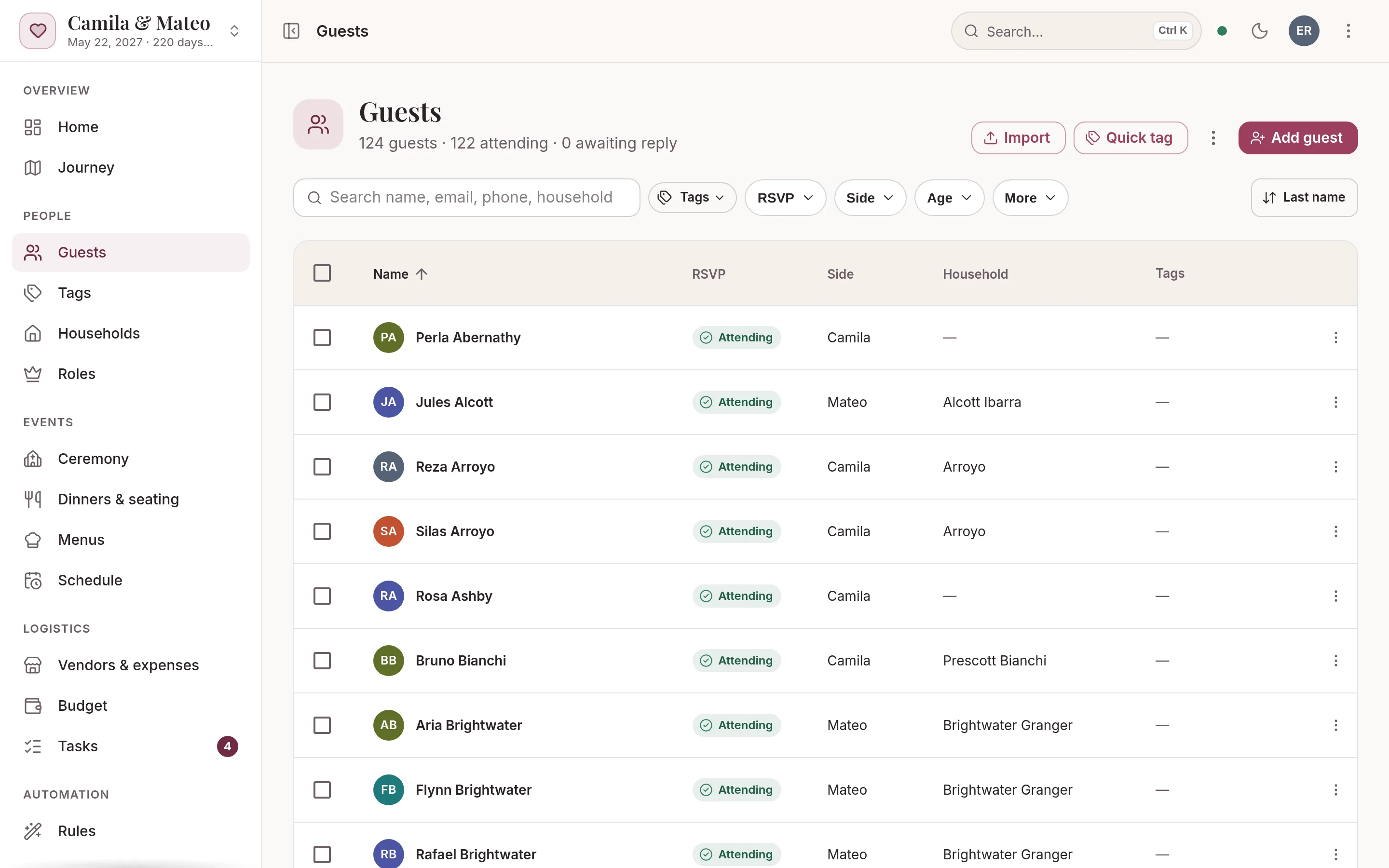
Your guest list and RSVPs in noiva
The list is the plan’s starting point: when a guest replies, the seating, the meal counts and the caterer’s headcount update with it.
- Import the list you haveBring a CSV from a spreadsheet or a Google Forms export. noiva matches your columns and values and flags possible duplicates before anyone lands in the list.
- Group families into householdsAuto-group suggests households from shared addresses and surnames. Pick the ones to create, and move anyone by hand.
- Send each household its linkEvery household gets a personal link. A guest answers for the whole household, picks each meal and notes any allergies, with no account and no password.
- Follow up from a reportThe RSVP follow-up report lists the households still to answer, with a contact for each and the days since they were invited. Your checklist schedules the follow-up a month before the wedding.
Free includes up to 50 guests, 2 people planning, every planning tool and your wedding website, but no AI credits for the assistant.
The Wedding Pass ($149 once) or Monthly ($15 a month) adds unlimited guests, 500 AI credits a month for the assistant and a custom domain.
Most guest lists run 80 to 300: import your first 50 free, upgrade in a click. Compare plans →
Questions
When should wedding RSVPs be due?
About a month before the wedding. It leaves time to follow up with the households that haven’t replied and to finish the seating before the caterer and the venue need final numbers, usually two weeks out.
Do guests need an account to RSVP in noiva?
No. Each household gets a personal link. Opening it is enough to answer for everyone in the household, choose meals and note allergies.
Can I import the guest list I already have?
Yes. Export it as a CSV from your spreadsheet or Google Forms and import it. noiva matches your columns, maps values like “Bride’s side” to the right field and flags possible duplicates first.
More guides
How to make a wedding seating chart
When to start, who to seat first, how many fit at a table and what the venue needs from you the week of the wedding.
Wedding vendor payment tracker
Write down every payment each contract names, track quoted, contracted and paid, and look sixty days ahead.
Padrinos: wedding sponsor traditions and roles
Velación, anillos, arras, lazo and the rest: what each pair brings, how to ask them and when they take part in the ceremony.
A wedding planning spreadsheet alternative
What a spreadsheet does well, where it breaks once RSVPs and seating start, and how to move it into one connected plan.

Your wedding, beautifully under control.
Setting up your wedding takes a minute, and you won’t need a card or a password. Add your guests and invite your partner today.